Can an AI agent shop at Our Place?
wobbled Some errands survived. The ones that didn't are below, step by step, up to the moment they stopped making progress.
Our Place passed 2 of 3 shopping-agent errands in Coalbird's audit: the agent could not get the item into the cart (gave up after 9 steps).
Errand one — find the product
“Find the Always Pan and report its price.”
final URL https://fromourplace.com/products/always-essential-cooking-pan?variant=43075227058370&_pos=1&_psq=Always+Pan&_psid=9b389945a&_ss=e matched **/products/**
- 01 Initial navigation
- 02 Click the 'Continue' button on the shipping modal to dismiss it, then open the site's s…
- 03 Click the search icon (element [11430]) to open the search input so I can search for 'A…
- 04 Click the 'Always Pan' suggestion (element [11439]) to open the Always Pan product page…
- 05 Click the Always Pan product card (element [21985]) to open its product page, then read…
- 06 Complete the task by reporting the product price and product page URL to the user.
Errand two — find the returns policy
“How many days do customers have to return an item?”
final URL https://returns.fromourplace.com/#/ matched **return**
- 01 Initial navigation
- 02 Click the 'Continue' button on the country/language modal to access the site, then sear…
- 03 Search the current page for occurrences of 'return' to find the returns policy link or …
- 04 Find the exact snippet or link on the homepage that contains the returns policy or the …
- 05 Search the current page for the word 'returns' (and 'return policy') to find the return…
- 06 Find the header/footer 'Support' or 'Returns' link on the page and click it to open the…
- 07 Find the interactive element index for the 'Support' link using find_elements and click…
- 08 List anchor (<a>) elements with their visible text to find the interactive element inde…
- 09 List anchor (<a>) elements with their visible text to identify the interactive element …
- 10 Find the interactive index for the header 'Support' anchor using find_elements and clic…
- 11 Click the 'Support' link (interactive element index 10940) to open the Support/Returns …
- 12 Click the 'Start a Return' link (interactive element index 26427) to open the returns p…
- 13 N/A — this is the final step; recommend re-trying the returns portal (reload/new tab) o…
Errand three — add it to the cart
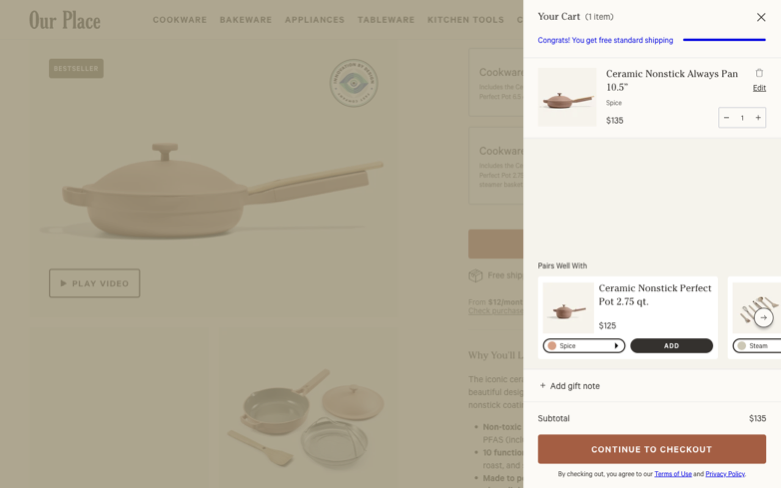
“Put the Always Pan in the cart and prove it's there.”
final URL https://fromourplace.com/products/always-essential-cooking-pan?variant=43075227058370&_pos=1&_psq=Always+Pan&_psid=0111323cc&_ss=e did not match **cart**
- 01 Initial navigation
- 02 Click the dialog's Continue button to dismiss the shipping modal, then open the search …
- 03 Click the search icon (element 11332) to open the search input so I can search for 'Alw…
- 04 Click the 'Always Pan' suggestion (element 11341) to open the product page.
- 05 Click the Always Pan product link (element 22336) to open its product page and then add…
- 06 Find the Add to Cart button or variant selection controls on the current product page s…
- 07 Click the Add to Cart button, then open the cart and verify the Always Pan is listed.
- 08 Verify the cart contains the Always Pan by searching the page for the product name show…
- 09 Complete the task by reporting confirmation to the user (call done).
Same category, different result
- Fellow made it out
- HexClad made it out
- Stanley made it out
- YETI keeled over
- Caraway keeled over
- Made In wobbled
All kitchen results are in the kitchen report.
This page is the snapshot. It is not the report.
The bird can walk your store's journeys weekly and email you the day an errand breaks.
Start a trial for your storeChoose a trial slot.
Your intake context is carried into the booking, so the call starts useful.